CRM for HVAC Contractors: One Connected Workflow Tool
Looking for a CRM for HVAC contractors? See how LeadFlow connects leads, estimates, payments, and production in one workflow. Book a demo today.
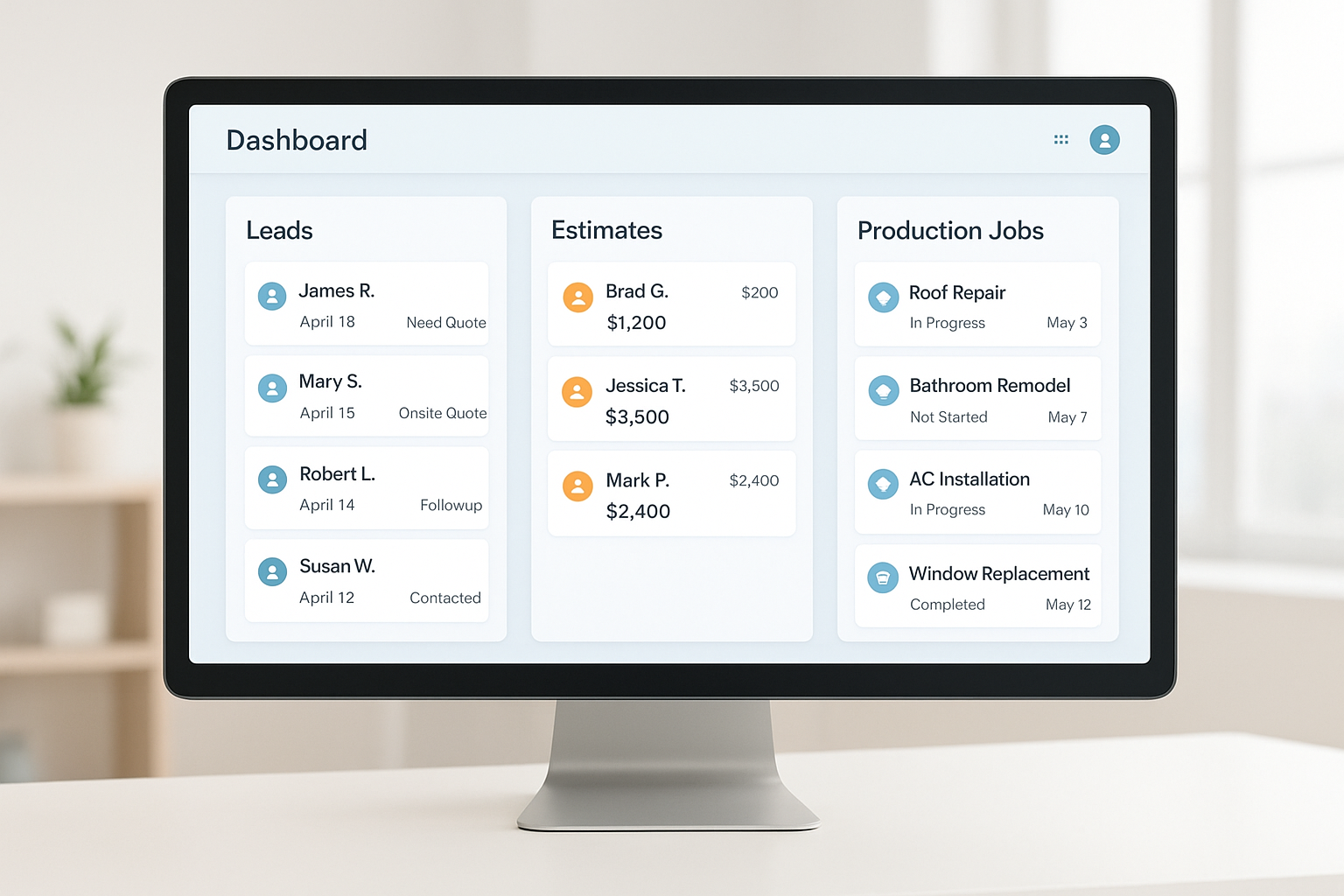
A CRM for HVAC contractors is the backbone that keeps every heating and cooling job moving from the first phone call through the final payment, without data getting lost between departments. Many HVAC companies still rely on spreadsheets, sticky notes, and disconnected apps to manage sales, scheduling, and installation crews — and that patchwork approach creates duplicate data entry, missed follow-ups, and frustrated customers. In this guide, you'll learn exactly what a CRM for HVAC contractors does, which features actually move the needle, how pricing typically works, what mistakes to avoid, and how a connected workflow platform like LeadFlow keeps office staff, technicians, and production crews aligned on every single job.
Quick answer: A CRM for HVAC contractors links lead tracking, scheduling, estimates, signatures, payments, material orders, and production into one connected workflow — so technicians, salespeople, and office staff all work from the same job record instead of five disconnected tools.
A connected workflow screen illustrates how a CRM for HVAC contractors keeps lead, estimate, and production data in one place.
What Is a CRM for HVAC Contractors?
A CRM for HVAC contractors is a system built around the full job cycle, not just contact storage. Unlike a general customer relationship management (CRM) tool designed for any industry, an HVAC-focused workflow CRM understands the specific stages a heating and cooling job moves through: inbound call, appointment, estimate, signed agreement, deposit, material order, installation, and final payment.
In practice, this means the same job record follows the customer through every stage. For example, when a sales representative closes an estimate, a production job can be created automatically instead of someone manually re-typing the address, scope, and pricing into a second system. As a result, fewer details fall through the cracks between the office and the field, and customers get a more consistent experience from quote to installation.
CRM for HVAC Contractors vs. Generic Field Service Software
Many tools marketed to HVAC companies are really just field service or dispatch software wearing a CRM label. They schedule technicians and track truck locations, but they often stop short of managing the sales pipeline that happens before the job and the material ordering that happens after it is sold. A true CRM for HVAC contractors, in contrast, covers the entire lifecycle: lead intake, sales follow-up, estimate approval, signed agreements, payment collection, material ordering, and production tracking, all tied to one record.
If you are comparing options more broadly across home improvement trades, it also helps to see what is considered the best CRM for home improvement companies overall, since many HVAC contractors also run adjacent trades like insulation, roofing, or plumbing under one business.
Why HVAC Companies Need a Connected Workflow, Not Just Scheduling
HVAC work involves several handoffs: a call center or office books the appointment, a sales representative sells the job, and a production crew installs the equipment. Without a connected workflow CRM for HVAC companies, each handoff usually depends on someone remembering to update a spreadsheet, send an email, or make a phone call.
Consequently, jobs stall, material orders get delayed, and office staff spend hours chasing updates instead of serving customers. According to the U.S. Bureau of Labor Statistics, demand for HVAC technicians is projected to keep growing faster than the average for all occupations, which means companies that scale their administrative systems alongside their crews are better positioned to handle that growth without adding unnecessary office overhead.
Because HVAC businesses also manage HVAC systems installations that require specific equipment and materials, linking estimates directly to material orders helps avoid ordering the wrong parts or missing a delivery window before a scheduled install. The U.S. Department of Energy's guidance on heating and cooling systems underscores just how equipment-specific and efficiency-sensitive these installs are, which is exactly why mismatched material orders are so costly to fix mid-job.

Field crews can view job details and production schedules directly from a connected workflow system.
Must-Have Features in HVAC Contractor CRM Software
Not every CRM is built for how HVAC companies actually operate. Specifically, the following features tend to matter most for heating and cooling businesses comparing HVAC contractor CRM software. For a broader breakdown of pricing and setup across home improvement trades, see this home improvement CRM guide covering features and cost.
Lead Management and Call Queues
A strong system organizes inbound calls and prospects into queues so no lead sits untouched. Sales teams can see which prospects need follow-up, which appointments are booked, and which jobs are waiting on a decision, all from one lead management view.
Scheduling, Dispatch, and Technician Mobile Access
Beyond booking appointments, a complete CRM for HVAC contractors should give dispatchers a clear view of technician availability so jobs get assigned to the right person at the right time. Meanwhile, technicians in the field need mobile access to job notes, equipment history, and customer details, so they are never walking into a job blind.
Estimates, Signatures, and Payments
Online estimates with built-in signatures let customers approve a job without printing paperwork. Afterward, deposits and payments can be tracked against the same job record, so office staff always know where a job stands financially.
Material Orders and Production Handoffs
Material orders tied directly to a job reduce the risk of ordering the wrong equipment. Furthermore, when a production job is created automatically after a sale, crews receive accurate job details without office staff re-entering information by hand. If your company manages installs across multiple trades, this best software for managing home improvement projects resource walks through production tracking in more depth.
Marketing Automation and Customer Follow-Up
Because HVAC demand is seasonal, a CRM that automatically reminds customers about maintenance agreements, filter changes, or seasonal tune-ups keeps revenue flowing in slower months. In addition, automated follow-up on open estimates recovers jobs that might otherwise go cold after the first visit.
Reporting and Job Profitability Analytics
Finally, owners need visibility into which lead sources convert, which technicians close the most add-on sales, and which jobs are actually profitable after labor and materials. Without that reporting layer, it is nearly impossible to know where to invest marketing dollars or coaching time.
How LeadFlow Delivers a True CRM for HVAC Contractors
LeadFlow is a connected workflow CRM for home improvement companies, including HVAC contractors, that ties leads, appointments, estimates, signatures, payments, material orders, production, and final payment together in one system. Rather than managing separate tools for sales and production, HVAC teams work from a single job record from the first call to project completion.
Specifically, LeadFlow can automatically create a production job once a sale is recorded, and material orders can be emailed and linked back to that same job. A TV job board then displays production milestones so office staff and crews can see job status at a glance, without needing a status-update phone call. You can review how this works in more detail through a full product tour, or explore the LeadFlow home improvement CRM platform directly.

A shared job board helps office teams track HVAC production milestones without constant status calls.
HVAC CRM Pricing: What to Actually Expect
Many enterprise HVAC CRM platforms require a sales call, a demo, and sometimes an annual contract before they will reveal a single price. That opacity makes it hard to budget early, especially for a smaller team that just wants to know if a tool fits its revenue. In contrast, transparent month-to-month pricing lets a contractor compare tiers up front and change plans as the business grows, without renegotiating a contract.
Pricing for a CRM for HVAC contractors typically scales with the number of users and the features included, such as material order automation or advanced reporting. Therefore, the most reliable way to budget is to compare current plan options for growing HVAC teams rather than relying on industry averages, which vary widely by provider.
Step-by-Step: Launching Your HVAC CRM Workflow
Switching systems can feel disruptive, but a structured rollout keeps the transition manageable. Below is a general sequence HVAC companies can follow when adopting a connected workflow CRM.
- Map the current job workflow. Document every stage a job moves through today, from first call to final payment, including who handles each handoff between office, sales, and production.
- Migrate existing leads and jobs. Move active leads, customer records, and open jobs out of spreadsheets or a previous CRM so no job history or contact information is lost during the switch.
- Configure users, roles, and templates. Set up user accounts for office staff, sales representatives, and production crews, then build estimate templates that match how the company already prices jobs.
- Train every team live. Walk office, sales, and production staff through the new workflow together so each team understands how their actions affect the next stage of a job.
- Launch production handoffs and track milestones. Turn on automatic production job creation after a sale, connect material orders to each job, and begin tracking milestones on a shared job board.
- Review results after 30 days and refine. Check which teams are adopting the workflow fully, identify bottlenecks between handoffs, and adjust templates or user permissions based on real usage data.
Choosing the Right Plan for Your HVAC Team
Team size usually determines which plan fits best. A solo operator or small crew may only need a starter tier supporting a few users, while a growing office with more sales and production staff typically needs a mid-tier plan with additional seats.
In contrast, established companies or those running multiple locations generally require enterprise-level plans designed for larger teams. Because plans are offered month-to-month and can be canceled at any time, HVAC contractors are not locked into a long-term contract while they figure out which tier fits. For contractors who also want flexibility to customize fields and workflows, this customizable CRM buyer's guide for contractors is a useful next read before scheduling a conversation.
Common Mistakes HVAC Companies Make When Switching CRM Systems
Even the best CRM for HVAC contractors will underperform if the rollout is rushed. Specifically, these are the mistakes that show up most often:
- Skipping data migration. Starting from a blank system loses job history and forces duplicate work for the whole office.
- Training only one department. If production never learns the new workflow, sales still has to call and relay job details manually.
- Choosing a plan based on price alone. A cheaper tier that lacks material order automation often costs more in wasted labor over time.
- Ignoring the reporting tools. Owners who never check lead-source or profitability reports miss the main reason to adopt a CRM in the first place.
Frequently Asked Questions About CRM for HVAC Contractors
What is a CRM for HVAC contractors?
A CRM for HVAC contractors is software that connects lead tracking, appointments, estimates, payments, material orders, and production into one workflow. It replaces scattered spreadsheets and separate apps so office, sales, and installation teams work from the same job record.
How does a CRM for HVAC contractors connect sales and production?
Most platforms automatically create a production job once a sale or signed estimate is recorded, carrying over job details, photos, and payment status. This removes the need to re-enter the same information for the installation team.
Why do HVAC companies need workflow software instead of spreadsheets?
Spreadsheets do not update automatically across departments, so leads, estimates, and job statuses easily fall out of sync. A connected workflow CRM keeps one source of truth for every job from first call to final payment.
How much does a CRM for HVAC contractors cost?
Pricing typically depends on the number of users and features needed, and plans are often offered month-to-month rather than locked into long-term contracts. Reviewing a current pricing page is the most reliable way to compare plan tiers.
How long does onboarding take for an HVAC CRM platform?
Onboarding timelines vary by company size and data complexity, but done-for-you setup typically includes account configuration, data migration, user setup, and live training. Teams with simpler workflows and smaller user counts generally launch faster.
What is the difference between a CRM for HVAC contractors and a basic scheduling app?
A basic scheduling app only manages appointments, while a full workflow CRM links leads, estimates, signatures, payments, materials, and production together. The CRM approach reduces duplicate data entry across departments.
What common mistakes do HVAC companies make when switching CRM systems?
A common mistake is skipping data migration and starting from a blank system, which loses job history and creates duplicate work. Another is failing to train every team, which leaves sales or production staff working outside the new workflow.
Can existing leads and jobs be migrated into a new HVAC CRM?
Yes, existing leads and jobs can usually be migrated from spreadsheets or a previous CRM during onboarding. This preserves job history so office and sales teams are not starting over.
Is company data private and secure in a workflow CRM?
Reputable platforms give each company an isolated, private workspace so job and customer data is not mixed with other businesses. It is still worth confirming data handling practices directly with the provider.
Which CRM plan fits a small HVAC team versus a multi-location company?
Smaller HVAC teams often fit starter tiers supporting a handful of users, while growing offices need mid-tier plans with more seats. Multi-location companies or larger teams typically require enterprise-level plans built for scale.
What integrations are available for larger HVAC operations?
Integration availability varies by provider and plan level, with enterprise tiers generally offering more configuration options for larger or multi-location teams. Confirming specific integrations during a demo is the most accurate way to check fit.
What is the cancellation policy for a month-to-month HVAC CRM?
Month-to-month plans generally allow a company to cancel at any time without being locked into a long-term contract. This gives HVAC contractors flexibility as team size or needs change.
What training and launch support come with a CRM for HVAC contractors?
Done-for-you onboarding commonly includes account configuration, data migration, user setup, and live team training. This helps office staff, sales representatives, and production crews start using the connected workflow correctly from day one.
Is a CRM for HVAC contractors worth it for a small HVAC business?
Yes. Even a two- or three-person HVAC crew benefits from a CRM for HVAC contractors because it eliminates double data entry and lost leads, which are two of the most common profit leaks for small service businesses. Starter-tier pricing is usually built with small teams in mind, so the investment scales with the business.
How is a CRM for HVAC contractors different from general field service management software?
General field service software typically focuses on scheduling and dispatch alone, while a true CRM for HVAC contractors also manages the sales pipeline, estimates, signatures, and payments ahead of the job, plus material ordering and production after the sale. In short, field service software covers the middle of the job; a connected CRM covers the entire lifecycle.
Can a CRM for HVAC contractors help with marketing and customer retention?
Many platforms include automated follow-up reminders and full customer history that help sales teams spot maintenance agreement renewals or repeat-service opportunities. Because every past job and payment is tied to the customer record, follow-up outreach can be targeted instead of generic.
Bringing It All Together
Choosing a CRM for HVAC contractors ultimately comes down to whether the system connects the full job, not just a piece of it. Leads, appointments, estimates, signatures, payments, material orders, and production all influence each other, so keeping them in one workflow reduces admin work and keeps crews better informed. LeadFlow was built around that exact job cycle for home improvement companies, including HVAC contractors, with automatic production handoffs, job-linked material orders, transparent month-to-month pricing, and a shared job board to track milestones.
If your team is still coordinating jobs across spreadsheets, emails, and separate apps, it may be worth seeing how a connected workflow would look for your specific process. You can start by exploring LeadFlow's workflow CRM or booking a personalized demo to walk through how your current job stages would map into one system.
